
S1Game Download 2026 – Features, Registration, Login and Complete Guide
Today
14 MB
1.4.3
Android 4.4+
2938

Description
S1Game is a name used by online gaming platforms that advertise mobile games and account-based gaming features for users in Pakistan. People searching for S1Game generally want to learn about its game categories, application installation, account registration, login process, and available features before deciding whether to use the platform.
In this guide, we explain the main features commonly advertised for S1Game, how to approach downloading the application, what to check during registration, and how to protect your account and personal information. Since application versions and platform features can change, always verify the details on the website you intend to use before downloading or creating an account.
If you are searching for S1Game APK, this article will help you understand the basic process and important precautions before getting started.
What Is S1Game?
S1Game is promoted on some websites as an online gaming platform featuring several types of mobile games. Depending on the version and service, the advertised categories may include card games, slot-style games, fishing games, lucky spins, and other interactive entertainment.
The platform is designed to provide access to gaming features through a mobile-friendly interface. Users may encounter options for creating an account, signing in, viewing game categories, and managing account information.
Some versions of the service also advertise promotional rewards and payment features. However, these features should not be assumed to be available on every version, and advertised rewards or withdrawals are not guaranteed.
Before using S1Game, check the identity of the operator, the terms of service, the privacy policy, and the rules that apply in your location.
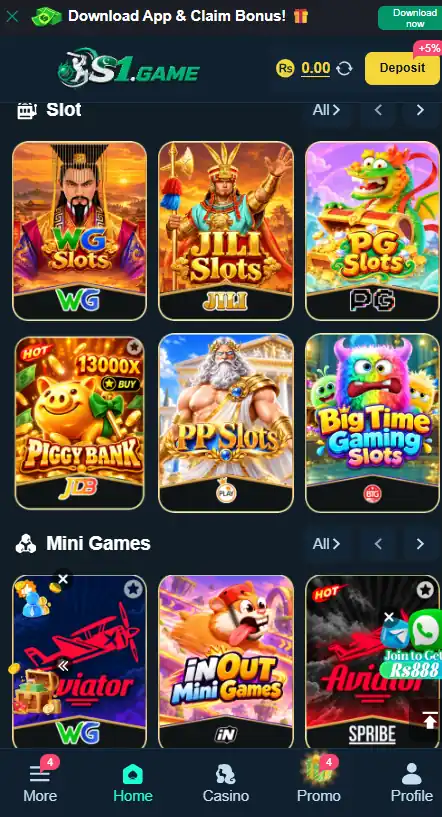
Main Features of S1Game
1. Multiple Gaming Categories
One of the main attractions advertised by S1Game websites is access to different gaming categories through a single interface. Depending on the available version, users may find card-based games, slot-style games, fishing games, or spinning games.
Having different categories can make browsing easier for users who prefer exploring multiple game formats. Check the actual application to confirm which games are available.
2. Simple User Interface of S1Game
A straightforward interface can help users navigate an application without spending too much time searching for basic options.
Common sections on gaming platforms may include a home screen, game categories, account settings, wallet information, and customer support. The exact layout and available options depend on the version being used.
3. Mobile Gaming Access
S1Game is advertised through websites that target mobile users, particularly Android users in Pakistan. A mobile-friendly layout can make it easier to access account features and browse available games on a smartphone.
Before installing an application, verify its compatibility with your device and check the publisher information.
4. Account Registration and Login
Some versions of S1Game provide account-based access. Registration and login options allow users to manage their profiles and return to the service using their account credentials.
Always create a strong, unique password and avoid sharing verification codes with other people.
5. Promotional Offers
Some websites advertising S1Game mention welcome promotions, referral programs, or other rewards. These offers may have specific eligibility rules, minimum requirements, expiry dates, or withdrawal restrictions.
Read all applicable terms before accepting an offer. Never deposit money simply because a promotion claims to provide a larger bonus.
6. Account and Payment Management
Certain versions may display wallet or transaction sections. If these options are available, review the platform’s payment rules and transaction records carefully.
Do not assume that a deposit, bonus, or displayed balance can always be withdrawn. Confirm the applicable conditions before making any financial transaction.
How to Download S1Game APK on Android
If you want to install S1Game on an Android phone, follow these general precautions and installation steps.
Step 1: Find a Verifiable Download Source
Locate the website associated with the application you intend to use. Confirm the publisher’s identity and check whether the download page provides clear information about the application.
Do not rely on a search result merely because it uses the words “official” or “latest version.”
Step 2: Check the Application Details
Before downloading, review the app name, version number, file size, update information, and requested permissions where available.
Be cautious if the download page provides inconsistent details or asks for unnecessary personal information.
Step 3: Download the APK File
If you decide to proceed, download the APK from a source you have independently assessed as trustworthy.
Avoid APK files distributed through unfamiliar file-sharing websites, unsolicited messages, or suspicious advertisements.
Step 4: Review Android Installation Settings
Android may block installation of applications from sources outside the Google Play Store.
If you choose to install a verified APK, follow Android’s security prompts and allow installation only for the specific source when necessary. Do not disable security protections indiscriminately.
Step 5: Install and Inspect the Application
Open the downloaded file and review the installation information. After installation, check the application’s permissions and ensure that they are appropriate for its stated functions.
If the application requests unusual permissions, displays unexpected warnings, or behaves suspiciously, do not continue using it.
Important: The availability, authenticity, and current version of an S1Game APK should be verified independently. Do not assume every website using the S1Game name distributes the same application.
How to Register on S1Game
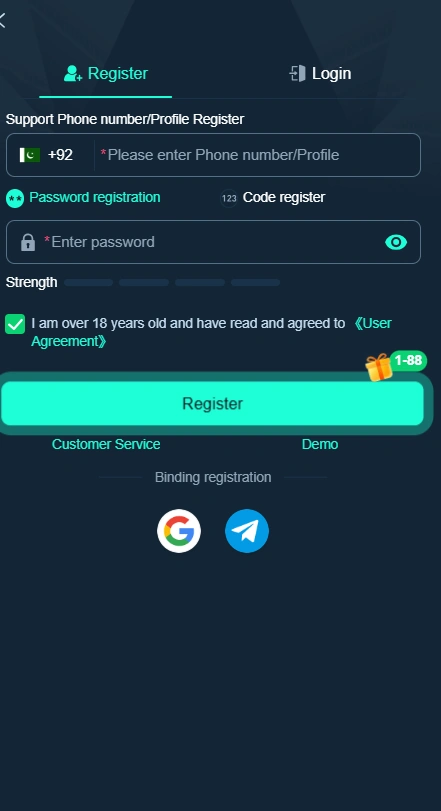
Registration procedures can vary by platform. If the version you have verified offers account creation, use the following general process.
- Open the verified service or installed application.
- Locate the Register or Sign Up option.
- Read the registration requirements and privacy information.
- Enter only the information necessary to create your account.
- Create a strong and unique password.
- Complete any legitimate verification steps requested by the service.
- Review the account terms before proceeding.
Keep your login information private. Never provide a one-time password, banking PIN, or account password to someone claiming to be a support representative.
If registration requires a deposit or sensitive financial information, pause and evaluate the risks before continuing.
How to Log In to S1Game
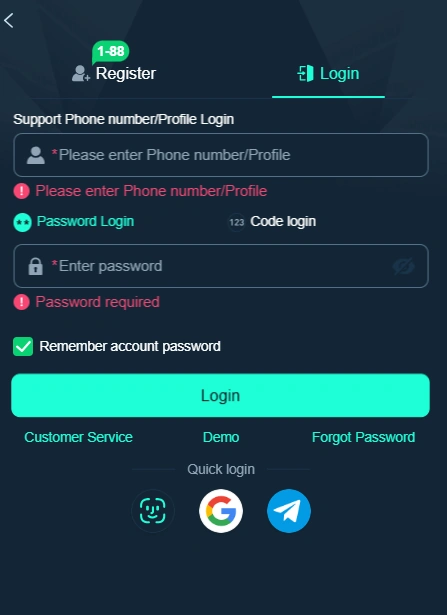
If you already have an account, the login process will generally involve the following steps:
- Open the same service where your account was registered.
- Select the Login option.
- Enter your registered account details.
- Type your password carefully.
- Complete any required security verification.
- Review the account information after signing in.
Use only the genuine login page associated with your account. Avoid entering your password after following unsolicited links sent through messages or social media.
How to Recover a Forgotten Password of S1Game
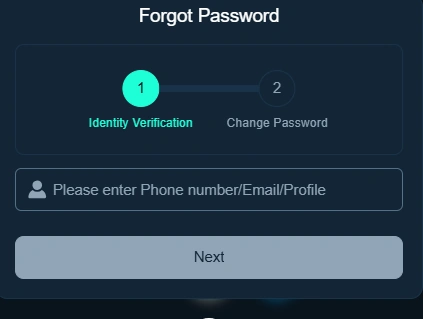
If you cannot remember your password, look for a Forgot Password or account recovery option on the verified login page.
Follow the instructions provided by the service and use only the email address or phone number associated with your account. If verification is required, enter the code only on the genuine recovery page.
If recovery does not work, contact support through independently verified contact details.
Never pay an unknown person who promises to recover your account, and do not share your verification codes with anyone.
Understanding S1Game Deposits and Withdrawals
Some S1Game websites advertise deposit and withdrawal options for Pakistani users. The available methods, transaction limits, fees, processing times, and eligibility rules may differ between services.
Before making a payment, carefully examine the following points.
Check the Deposit Rules
- Confirm the minimum and maximum transaction amounts.
- Review any fees and applicable terms.
- Check whether the payment recipient matches the service you intended to use.
- Keep your transaction receipt and reference number.
- Never send money to an unverified personal account.
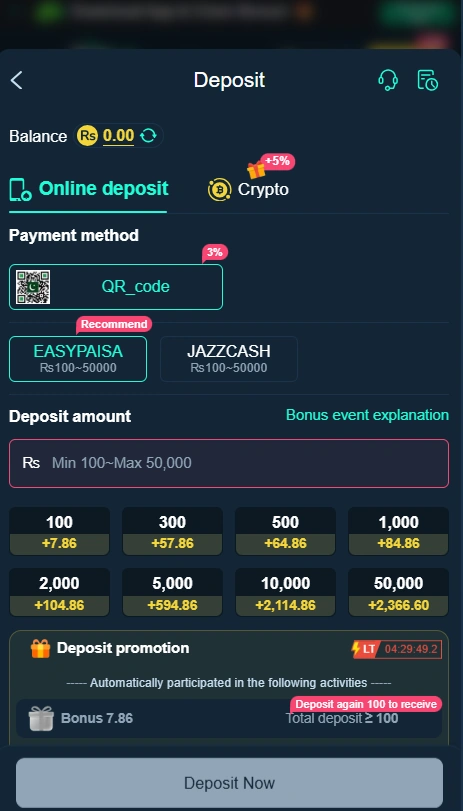
Understand Withdrawal Conditions
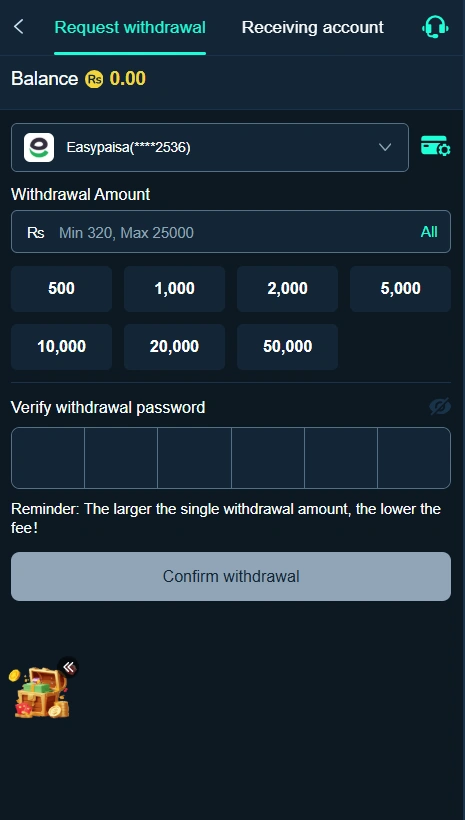
If a platform advertises withdrawals, read its conditions before adding money. Check identity verification requirements, minimum withdrawal limits, fees, bonus restrictions, and expected processing times.You can withdraw the real money through easypaisa, bank account and jazzcash.
A displayed account balance is not proof that funds can be withdrawn successfully. If a service requests additional deposits or unexplained fees to release your balance, stop and independently verify the request.
Protect Your Payment Information
Never share your banking password, mobile wallet PIN, card security code, or one-time password with another person.
Use official payment applications and check every transaction before confirming it. Contact your payment provider if you notice an unauthorized transaction.
Is S1Game Safe to Use?
Safety depends on the particular website, application, operator, and transaction process. The S1Game name alone does not establish that a service is legitimate or secure.
Before using any version of the platform, consider these checks:
Verify the Publisher
Look for consistent publisher details, a working support channel, and clear company or operator information. Be careful when different websites claim to be the official source for the same application.
Review App Permissions
An application should request permissions that make sense for its functions. Be cautious if a gaming app requests unnecessary access to contacts, messages, accessibility settings, or other sensitive areas of your device.
Read the Privacy Policy
Check what information is collected, how it is used, whether it is shared, and how you can request account deletion where applicable.
Examine Payment Terms
Read the deposit, withdrawal, refund, and promotional conditions. Do not rely solely on testimonials or claims of instant payouts.
Check Legal Restrictions
Online gambling and real-money gaming may be subject to restrictions and licensing requirements. Check the current laws that apply to your location and the specific service before participating.
No online platform should be treated as risk-free simply because it advertises security features.
Advantages and Disadvantages of S1Game
Potential Advantages
- Multiple gaming categories may be available in one interface.
- Mobile-oriented access may make navigation convenient.
- Account features can help users manage their profiles.
- Different game formats may appeal to different preferences.
- Some versions advertise promotional events and additional features.
These are potential advantages of the advertised service, not independently verified guarantees.
Potential Disadvantages
- Different websites may use the same or a similar platform name.
- APK files from unverified sources can create security risks.
- Advertised features may vary by version.
- Payment and withdrawal outcomes may be uncertain.
- Real-money gaming can lead to financial losses.
- Promotional terms may impose restrictions that users overlook.
Review the risks carefully before deciding whether to use the platform.
Tips for a Better and Safer Gaming Experience
Read the Rules First
Understand the instructions and rules of a game before playing. Do not assume that different games use the same rules or reward systems.
Set Clear Spending Limits
If a service involves real money, use only money you can afford to lose. Set a strict limit in advance and never borrow money to continue playing.
Avoid Guaranteed-Earning Claims
No gaming strategy can guarantee profit from games involving chance. Be suspicious of anyone promising a fixed daily income, guaranteed returns, or certain winning methods.
Keep Your Device Updated
Install Android security updates and keep your device’s built-in security features enabled. Remove applications you no longer trust.
Protect Your Account
Use a unique password, secure your recovery email or phone number, and avoid logging in on shared devices. Sign out when finished using a public or shared device.
Take Breaks
Set reasonable time limits and stop playing if the activity becomes stressful or affects your work, studies, relationships, or finances.
Common S1Game Problems and Possible Solutions
S1Game Is Not Installing
Check whether the APK is compatible with your Android version and whether your device has sufficient storage. If the source is unverified or Android displays a security warning, do not bypass the warning without investigating it.
S1Game Is Not Opening
Restart your device and check your internet connection. If the problem continues, check for reliable information about the current application version before reinstalling it.
Login Is Not Working
Check your login details and use the official account recovery process if needed. Avoid repeatedly sharing your credentials with unofficial support accounts.
A Transaction Is Pending
Save the transaction reference and review the payment provider’s status. Do not immediately submit another payment, as doing so could create a duplicate transaction.
Customer Support Is Not Responding
Use independently verified contact information and retain relevant screenshots or receipts. Never give remote access to your phone or disclose your financial credentials to someone claiming to fix an account problem.
Frequently Asked Questions About S1Game
S1Game is a name used by online gaming services that advertise different game categories and account features. The exact features depend on the particular website or application.
Find a verifiable source, check the publisher and application details, and review the file and requested permissions before installing. Avoid unknown APK distribution websites.
Websites advertise S1Game to Pakistani users, but availability and eligibility depend on the specific service and applicable local rules. Confirm these details before registering.
Some websites advertise their APK files as free downloads. However, downloading an application for free does not mean every feature is free or that gameplay has no financial risk.
Some services using the S1Game name advertise Android applications. Verify the current version, device compatibility, and publisher before installing.
No. Gaming outcomes and rewards cannot be guaranteed. Be cautious of claims promising fixed income, certain wins, or risk-free profits.
Use the password recovery feature on the verified login page and follow the service’s official verification instructions. Never share recovery codes with another person.
No. Advertised payment methods do not guarantee that a transaction will succeed. Review the service’s terms and independently verify payment requests before transferring money.
Use a unique password, keep verification codes private, check website addresses carefully, and avoid downloading files from untrusted sources.
It is safer not to install an application from a source you cannot verify. An APK may contain harmful software or collect information in unexpected ways.
Final Thoughts
S1Game is a name associated with online gaming services that advertise mobile gaming options and account-based features. Before downloading an application, take time to verify its source, understand its registration requirements, and review its privacy and payment policies.Visit PXBET for mare games.
A careful approach can help you avoid fake download pages, suspicious payment requests, and unnecessary security risks. Remember that advertised rewards do not guarantee earnings, and real-money gaming can result in financial losses.
If you are researching S1Game in Pakistan, prioritize reliable information, device security, and an understanding of the rules that apply to your location before making a decision.